
Photo Upload Guide
When uploading a photo please remember the following guidelines:
– Must be in color
– Taken within the last 6 months to reflect your current appearance
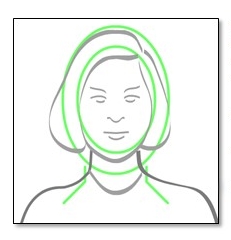
– Taken in full-face view directly facing the camera, your face and shoulders should take up the entire frame of the photo
– Taken in front of a plain white or off-white background
– Only one person in the photo
– No hats, sunglasses, funny faces, headphones, props, etc.
Photo Upload Instructions:
- Go to the “Purchase Now” button in the top right corner of the browser.
- Once in the store there is a icon that looks like a person – select this icon
- Login with your email address and password
- Once on your profile select Upload Photo
- You will be given the option to Upload New Photo that is already saved on your device or Use Camera to Take a New Photo. Follow the prompts and use the crop/zoom features to ensure the photo captures the face and shoulders. When finished, select “Save” to add the photo to the profile.
Season passholders who are under the age of 26 will be required to have a new photo that is less than 6 months old on file and those 26 and over will need a photo that is less than 18 months old.
Failure to follow these guidelines will delay the printing of your pass.
Need help? Email us your photo at fun@bristolmt.com along with your name and we can upload this for you.
If you need further assistance please contact Bristol Mountain at (585) 374-6000 and a Guest Services Representative will be in touch to assist you.
When uploading a photo please remember the following guidelines:
– Must be in color
– Taken within the last 6 months to reflect your current appearance
– Taken in full-face view directly facing the camera, your face and shoulders should take up the entire frame of the photo
– Taken in front of a plain white or off-white background
– Only one person in the photo
– No hats, sunglasses, funny faces, headphones, props, etc.
Photo Upload Instructions:
- Go to the “Purchase Now” button in the top right corner of the browser.
- Once in the store there is a icon that looks like a person – select this icon
- Login with your email address and password
- Once on your profile select Upload Photo
- You will be given the option to Upload New Photo that is already saved on your device or Use Camera to Take a New Photo. Follow the prompts and use the crop/zoom features to ensure the photo captures the face and shoulders. When finished, select “Save” to add the photo to the profile.
Season passholders who are under the age of 26 will be required to have a new photo that is less than 6 months old on file and those 26 and over will need a photo that is less than 18 months old.
Need help? Email us your photo at fun@bristolmt.com along with your name and we can upload this for you.
Failure to follow these guidelines will delay the printing of your pass.
If you need further assistance please contact Bristol Mountain at (585) 374-6000 and a Guest Services Representative will be in touch to assist you.